DicomObjects.NET10 Release Overview
Contents
- Overview & Key Highlights
- Performance Improvements
- GPU Rendering and Viewer Support
- Availability
Overview & Key Highlights
DicomObjects.NET10 is our latest release of DicomObjects, bringing improved performance, new rendering capabilities, and renewed viewer support for modern .NET applications.
Key highlights include:
- Improved performance compared with DicomObjects.NET8 and older versions
- New OpenGL-based GPU rendering, including support for 3D rendering
- Reintroduced viewer class support, allowing applications to create and use a DICOM viewer directly from the library
- Better responsiveness for image display and viewer interaction compared with the COM and .NET Framework viewers
- Continued support for modern .NET application development
Performance Improvements
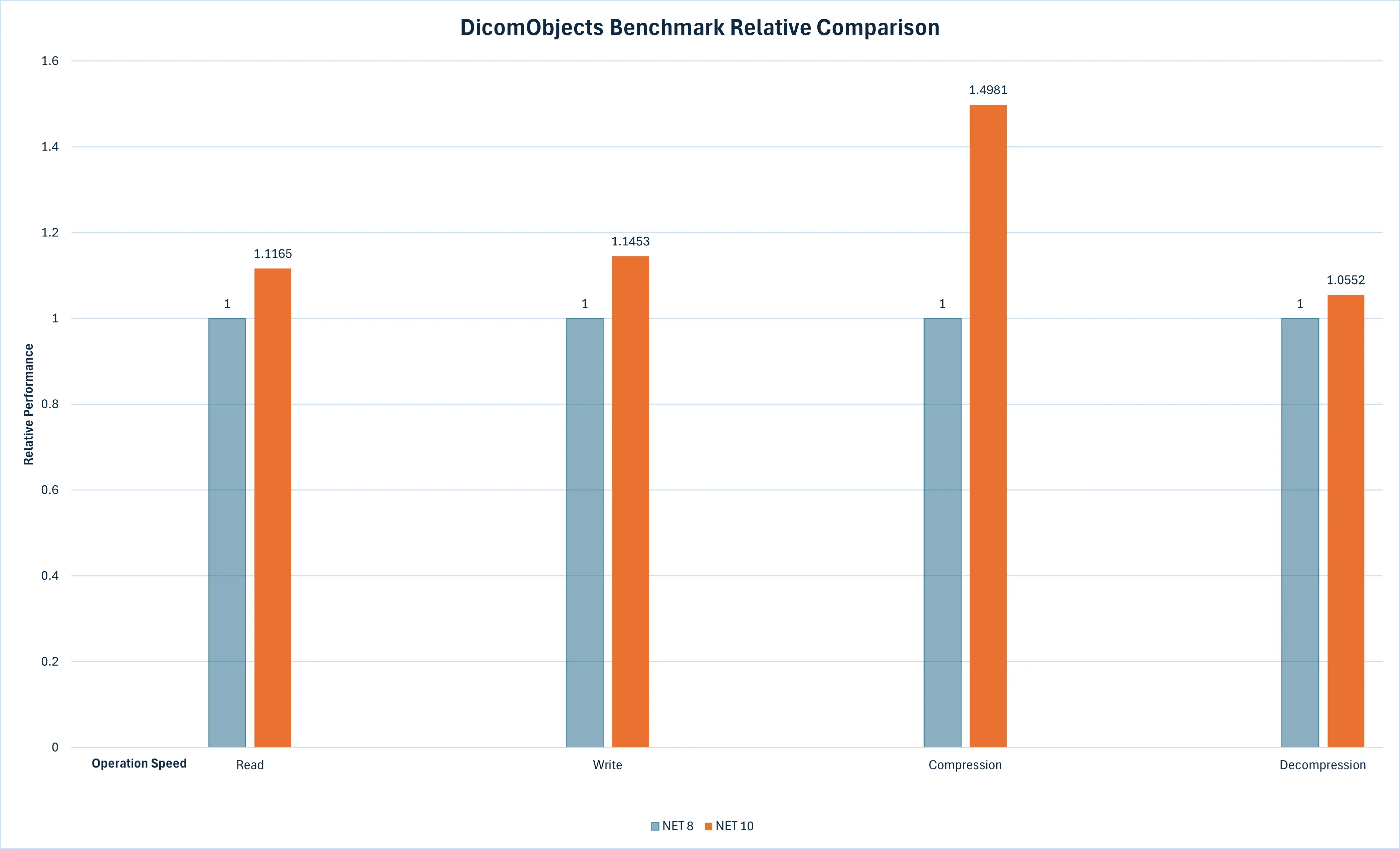
One of the main improvements in DicomObjects.NET10 is performance. Our internal benchmarks show improved results compared with DicomObjects.NET8 across a range of common DICOM operations.
The graph below shows a comparison between DicomObjects.NET8 and DicomObjects.NET10:
GPU Rendering and Viewer Support
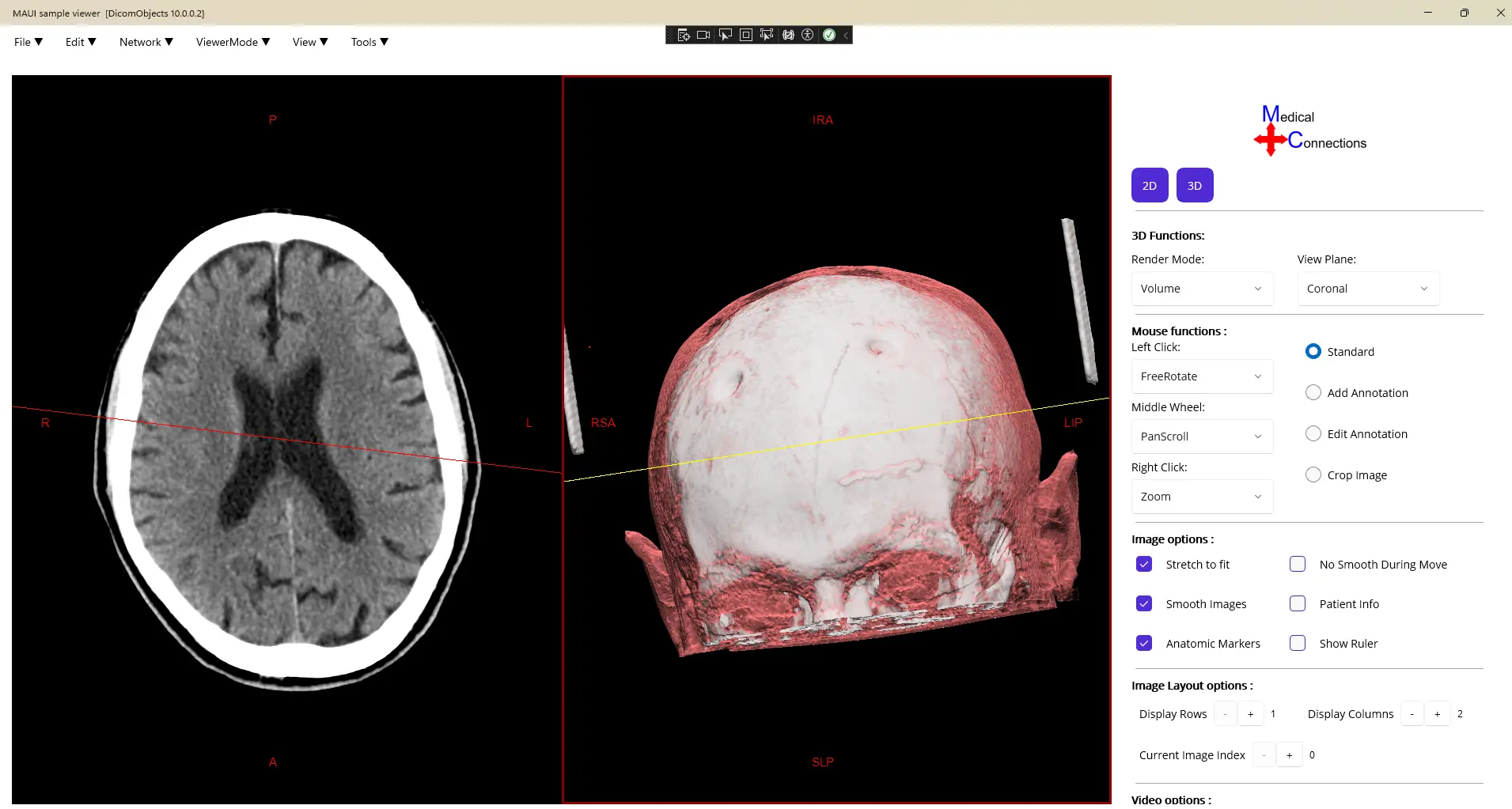
DicomObjects.NET10 introduces a .NET MAUI backed DicomViewer for displaying and interacting with DICOM images. It offers CPU and OpenGL-based GPU rendering pipeline with SkiaSharp, accessible via our new Maui/UI library available on our website and Nuget. The changes allows rendering workloads to be processed by the GPU to improve responsiveness in image viewing applications with or without viewer component. This brings feature parity with the previous .NET Framework and COM editions while delivering substantial improvements in both performance and stability.
-
For smaller datasets under 300 MB, users can expect rendering performance improvements in the range of 20% – 30%. The most significant gains, however, are seen with large and sparse datasets. By completely redesigning the rendering algorithm and optimizing the handling of sparse volume data, rendering performance can improve by up to 30× compared to previous versions in large and sparse volumes.
-
We have also doubled the maximum supported volume size for rendering, enabling significantly larger datasets to be visualized efficiently.
-
To further improve performance, a new adaptive sampling mode allows users to control the level of sampling reduction applied during rendering. A high-quality dithering pattern is then used to preserve visual fidelity, producing results comparable to full-resolution sampling while significantly reducing rendering cost.
-
Visual quality and clarity have also been enhanced through new tone mapping and gamma controls. These allow users to fine-tune lighting response and contrast within the renderer, ensuring illumination enhances the volume data without obscuring important anatomical or diagnostic detail.
DicomObjects.NET10 also reintroduces viewer class support. This allows developers to create and use a DICOM viewer directly from the library, similar to the functionality previously available in the .NET Framework and COM versions. In DicomObjects.NET10, the viewer support specifically targets .NET MAUI and uses MAUI components for modern cross-platform application development.
A sample viewer has been created for the .NET MAUI platform to demonstrate the new viewer support, GPU rendering, and 3D rendering capabilities in DicomObjects.NET10. This sample can be downloaded from the DicomObjects.NET10 products page, and the full MAUI documentation can be found here: .NET MAUI Documentation.
Availability
The latest version of DicomObjects.NET10 (Nuget & downloadable zip) and sample projects can be found on our DicomObjects.NET10 product page: DicomObjects.NET10